
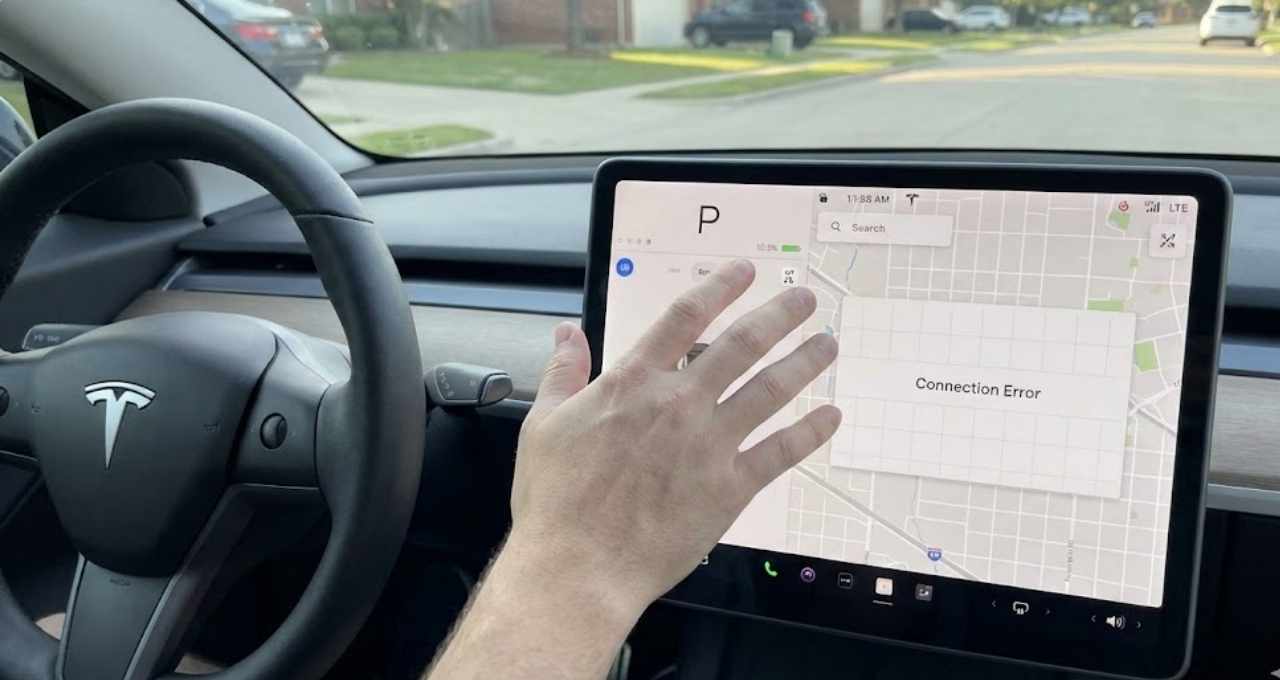
I still remember the morning it happened. I sat in the driver’s seat, coffee in hand, ready to head out. I tapped the screen to load my map. Nothing happened. The grid lines were there, but the map was blank.
Then I saw it. The little LTE bars in the corner had a line through them. No music. No traffic data. No voice commands.
My smart car suddenly felt like a “dumb” phone from 2005.
It was frustrating. But I learned that you are not alone. This happens to many owners. The good news? It is usually easy to fix.
Here is why your Tesla LTE stops working and exactly how I got mine back online.
What Does “Tesla LTE Not Working” Actually Mean?
When we say “LTE is not working,” we mean the car has lost its cellular data connection.
Think of your Tesla like a giant smartphone on wheels. It needs a signal to talk to the internet. When that signal cuts out, the car can still drive, but it loses its “brainy” features.
Here is what goes down when LTE fails:
- Maps & Navigation: You lose live traffic updates and satellite view.
- Streaming: Spotify, Apple Music, and Netflix won’t load.
- App Control: You cannot warm up the car remotely from your phone.
- Updates: The car cannot check for new software.
It is different from Wi-Fi. Wi-Fi is what you use at home to download big updates. LTE is the mobile data that works while you drive. If the LTE icon is crossed out or missing, your car is offline.
Common Signs Your Tesla LTE Is Not Working
How do you know for sure if it is the network or just a glitch? Look for these signs.
- The Icon is Dead: The LTE bars in the top right corner have a slash through them.
- Loading Spinners: Spotify just spins and spins without playing a song.
- Voice Assistant Fails: You press the right scroll wheel, say “Navigate home,” and it says “Connection Error.”
- App Disconnect: Your phone app keeps saying “Last seen 5 hours ago.”
Why Tesla LTE Stops Working (From My Experience)
Why does this happen? After digging through forums and talking to service techs, I found three main reasons.
Temporary Network Outages
Sometimes, it is not the car. It is the carrier. In the US, Tesla often uses AT&T. If the cell tower near you is down, your car goes down too.
I once thought my modem was broken. I reset the screen three times. Nothing. Then I checked my phone. I had no signal either. It was just a dead zone.
Software Bugs After Updates
I love new features, but updates can be tricky.
Last month, I installed a software update. The next morning, my LTE was gone. Sometimes, new code gets “stuck” when talking to the modem. It is like a computer that needs a restart after an install.
SIM Card or Modem Issues
This is rare, but it happens. The car has a physical modem inside. Just like a router in your house, it can overheat or fail. If resets don’t work, this might be the cause.
How I Fixed Tesla LTE Not Working (Step-by-Step)
Don’t panic. You don’t need to call a tow truck. Try these fixes first. They worked for me.
Quick Fixes That Worked Immediately
- The Soft Reboot (Scroll Wheels) This is the “magic trick” for 90% of Tesla problems.
- Park the car safely.
- Hold down both scroll buttons on the steering wheel.
- Keep holding until the screen goes black.
- Wait for the Tesla “T” logo to appear.
- Let go.
- The Airplane Mode Toggle This forces the modem to search for a signal again.
- Tap the Car icon > Safety.
- Power off the car (wait 2 minutes).
- Alternatively, go to Wi-Fi settings and toggle Wi-Fi on and off. Sometimes this nudges the LTE to wake up.
Advanced Troubleshooting
If the scroll wheels didn’t work, try a full power down.
- Sit in the driver’s seat. Close all doors.
- Go to Controls > Safety > Power Off.
- Do not touch anything for 2 minutes. No brake pedal, no screen taps.
- After 2 minutes, press the brake to wake it up.
When I Contacted Tesla Support
One time, none of this worked. I had to use the app to request service.
I opened the Tesla app and typed: “LTE not connecting for 48 hours. Did reset. Please check.”
They ran a remote diagnostic. They didn’t even need to see the car. They pushed a firmware update to my modem remotely. Two hours later, it was fixed.
How Long Does It Take for Tesla LTE to Come Back?
If it is a network outage, it might take a few hours.
If it is a glitch after an update, a reboot usually fixes it in 5 minutes.
My advice: If you drive into a dead zone, give it 10 minutes after you return to civilization. The modem can be slow to reconnect sometimes.
How to Prevent Tesla LTE Issues in the Future
You can’t prevent every bug, but you can help your car stay connected.
- Connect to Wi-Fi at home. This helps the car download updates cleanly without stressing the LTE modem.
- Don’t ignore updates. Tesla often sends “bug fixes” that solve connectivity issues.
- Watch the bars. If you see the signal drop often in the same spot, it is likely just bad coverage, not a broken car.
Is Tesla Premium Connectivity Required for LTE?
I get asked this a lot. “Do I need to pay $10 a month to get LTE?”
The answer is No.
Your car has a standard LTE connection for free. This powers the basics:
- Navigation (just the lines, not the traffic colors).
- Software updates (critical ones).
- App connectivity.
Premium Connectivity ($9.99/mo) gives you the fun stuff:
- Live Traffic Visualization (the red and yellow lines).
- Satellite-View Maps.
- Video Streaming (Netflix/YouTube over LTE).
- Music Streaming (Spotify/Apple Music over LTE).
If you stop paying, your LTE still works. You just lose the heavy-data features.
FAQs – Tesla LTE Not Working
Why is my Tesla LTE not working but Wi-Fi works?
This points to a cellular issue. Your screen and computer are fine because Wi-Fi connects. The problem is strictly with the LTE modem or the cell tower signal. A scroll wheel reset usually fixes this.
Does Tesla LTE work without Premium Connectivity?
Yes. You still have “Standard Connectivity” for free. This keeps your app connected and maps working. You just won’t get satellite view or music streaming without Wi-Fi.
How do I reset LTE in my Tesla?
Perform a soft reboot. Hold both scroll buttons on the steering wheel until the screen turns black. When the “T” logo returns, the LTE modem resets.
Is Tesla LTE down right now?
It might be. Check a site like “DownDetector” for AT&T (in the US). Since Tesla uses major carriers, a carrier outage affects the car.
Can Tesla LTE fail after a software update?
Yes. Updates can sometimes cause a “handshake” error between the software and the modem. A deep sleep (Power Off command) or a scroll wheel reset usually clears this bug.
Final Thoughts – My Honest Take on Tesla LTE Reliability
Look, I love my car. But tech isn’t perfect.
In my experience, the LTE works 99% of the time. When it fails, it is annoying, but rarely a disaster. It is usually just a software hiccup.
The best thing I learned? Patience.
Most of the time, the car fixes itself if you just park it and walk away for an hour. If you are stuck without music, just connect your phone via Bluetooth and play songs that way. It’s a solid backup plan.
Drive safe, and I hope your bars come back soon!

Jake Elston
I am Jake Elston, the founder of CarDetailFlow. I have eight years in car work. I hold a post-grad cert in Automotive Materials and Design Engineering from the University of Michigan–Dearborn. My goal is to share true, simple car help with all drivers.