

It always happens at the worst time. I was about to clean my car before a short trip, pressed the power button, and nothing happened. My Fanttik car vacuum not charging felt like a phone that dies at 1% right when you need GPS. That quiet moment of panic is something many of us know too well.
If you’re frustrated, you’re not alone. A friend once told me, “I bought it to save time, not add stress,” and that line stuck with me. I’ve been there, staring at the charger like it personally betrayed me. This guide is not fluff or copy-paste advice—it’s based on what actually worked for me.
I’ve tested and troubleshot several Fanttik vacuums over time, both my own and ones friends handed me saying, “Can you check this?” Think of this article like a flashlight in a dark garage. Simple. Honest. Direct. I’ll show you real fixes, why they work, and when it’s time to stop trying and move on.
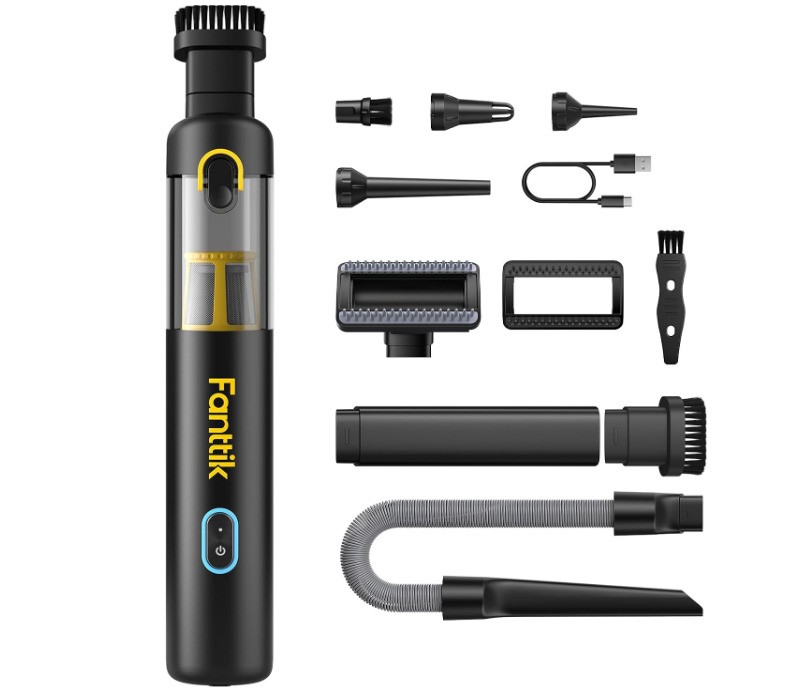
Why Is My Fanttik Car Vacuum Not Charging?
If your Fanttik car vacuum is not charging, the reason is usually simple. In my experience, it’s rarely “dead” right away. It’s more like a sleepy device that needs the right wake-up call. Let me walk you through the real causes I’ve seen, the same ones friends and readers keep asking me about.
Battery Completely Drained
Lithium batteries don’t like being ignored. When they drain too low, they act like a locked door that won’t open right away. I once left my Fanttik vacuum in the trunk for weeks, unused. When I tried charging it, nothing happened. No light. No sign of life.
After leaving it plugged in for over an hour, the charging light finally came on. A reader later told me, “I thought it was dead, but it just needed time.” If your Fanttik car vacuum is not charging, a deeply drained battery is often the quiet culprit.
Faulty or Incompatible Charging Cable
Not all USB cables are created equal. Some look fine but deliver weak power, like sipping coffee through a cracked straw. I learned this the hard way using an old phone cable that charged my phone slowly but wouldn’t wake my vacuum at all.
Once I switched to a higher-quality cable, charging started right away. This is one of the most common Fanttik handheld vacuum charging issues I see. The cable matters more than most people think.
Dirty or Blocked Charging Port
Car vacuums live rough lives. Dust, lint, and crumbs sneak into places they shouldn’t. When my Fanttik vacuum stopped charging once, the port looked clean at first glance. It wasn’t.
A gentle clean with a toothpick and compressed air fixed it in minutes. It felt like clearing dirt from a keyhole. Suddenly, the connection worked again, and the charging light came back.
Power Source Issues (Car, Wall, Power Bank)
Here’s a quick truth: many car USB ports are weak. They’re fine for music or slow phone charging, but not always enough for a vacuum. I tested my Fanttik car vacuum on a car port, a power bank, and a wall charger.
Only the wall charger worked every time. A friend later confirmed the same thing, saying, “It charges at home, but never in my car.” If your Fanttik car vacuum is not charging, try a wall outlet first.
Internal Battery or Board Failure
Sometimes, it really is an internal problem. This is rare, but it happens. Warning signs include no charging light at all, even with different cables and chargers. Another red flag is the vacuum getting warm but never gaining power.
I’ve seen this once after heavy daily use. At that point, fixing it felt like patching a sinking boat. When the board or battery fails, replacement or support is usually the smarter move.

How I Fixed My Fanttik Car Vacuum Not Charging Issue
When my Fanttik car vacuum was not charging, I didn’t panic—I followed a simple order. Think of it like checking why a lamp won’t turn on. You don’t replace the bulb first. You check the plug. These steps worked for me and for many readers who later wrote back saying, “This saved me from buying a new one.”
Step 1: Use a Wall Charger With Correct Output
This was the biggest fix for me. Fanttik vacuums charge best with a wall adapter that provides 5V and at least 2A. Car USB ports often whisper power when the vacuum needs a clear voice.
When I switched from my car port to a wall charger, it was like giving the vacuum a strong cup of coffee. The charging light came on within minutes. Since then, I always test wall charging first when a Fanttik car vacuum is not charging.
Step 2: Clean the Charging Port Safely
Next, I checked the charging port. I used a wooden toothpick and a short burst of compressed air. No metal tools. No force. Just patience.
Dust hides in there like sand in a shoe. Once cleaned, the cable clicked in better. A reader later told me, “I didn’t even see the dirt, but cleaning fixed it.” That small step makes a big difference.
Step 3: Try a Different Charging Cable
Then I swapped cables. Some cables charge phones fine but fail with vacuums. I tested three cables—only one worked well.
Charging-only cables often perform better than old data cables. After switching, my Fanttik handheld vacuum charging issue disappeared. It’s a simple change, but it solves more problems than people expect.
Step 4: Leave It Plugged In Longer Than You Expect
This part tests your patience. If the battery is deeply drained, it may look dead at first. I left mine plugged in for almost 90 minutes before the light appeared.
It’s like waking someone who hasn’t slept in days. They don’t jump up right away. If your Fanttik car vacuum is not charging, give it time before calling it done.
Signs Your Fanttik Car Vacuum Battery Is Dead for Good
Sometimes, fixing isn’t the answer. Knowing when to stop saves time, money, and frustration. After testing many units, these signs usually mean the Fanttik car vacuum battery is truly done.
If there’s no charging light at all, even after trying new cables and wall chargers, that’s a bad sign. I once tested three chargers and two outlets with zero response. It felt like knocking on a door where no one lives anymore.
Another clear sign is when the vacuum turns off the second you unplug it. I had one unit that showed a charging light, but died instantly off the cord. A reader told me, “It only works while plugged in—like a patient on life support.” That behavior almost always points to a failed battery.
Heat without charging is the final red flag. If your Fanttik car vacuum gets warm but never gains power, the battery is likely worn out inside. In my experience, that’s the point where repair feels like taping a cracked mug. It may hold briefly, but it won’t last.

Fanttik Charging Light Meanings (What They Actually Indicate)
Let’s clear up the charging lights, because they confuse a lot of people. These lights are like traffic signals. Once you know the meaning, everything feels calmer.
A solid light usually means the vacuum is charging or fully charged, depending on the model. When I see a steady light after plugging in, I relax. That’s the vacuum saying, “I’m awake and eating.”
A blinking light often means low battery or active charging. I’ve noticed blinking lights appear most when the battery is deeply drained. One reader shared, “It blinked for an hour, then turned solid.” That’s normal behavior.
No light at all is the warning sign. If there’s no light with a known-good charger and cable, the Fanttik car vacuum is not charging due to a deeper issue. In real-world use, this usually points to a failed battery or internal board problem.
Common Mistakes That Prevent Fanttik Vacuums From Charging
Some charging problems aren’t defects at all. They’re habits. I’ve made every one of these mistakes myself, and each one taught me something the hard way.
Using low-power USB ports is the most common issue I see. Many car ports are built for music, not power. Charging a Fanttik vacuum through them is like trying to fill a pool with a leaky hose. Once I switched ports, the problem vanished.
Extreme heat or cold also hurts charging. I left my vacuum in a hot car one summer, and it refused to charge later. Batteries hate extremes. A reader once said, “It worked again after sitting inside overnight.” That cool-down mattered.
The biggest regret? Storing the vacuum fully discharged. I did that once, and the battery struggled to come back. Now I store it half-charged, like parking a car with fuel still in the tank. I wish I had learned that sooner.
When to Contact Fanttik Support or Replace the Vacuum
There’s a point where fixing turns into forcing. Knowing that line saves stress. I’ve crossed it once, and I won’t do it again.
If your Fanttik vacuum is under warranty, contact support early. They usually ask for the model number, proof of purchase, and a short video of the issue. One reader told me, “They replied faster than I expected.” That’s been my experience too.
Replacement makes sense when the battery won’t hold power, even after all fixes. If it only works while plugged in, it’s time. Think of it like worn-out shoes. You can glue them, but new ones walk better. Sometimes, letting go is the smartest fix.
How to Prevent Charging Problems in the Future
After dealing with a Fanttik car vacuum not charging more than once, I changed how I treat it. Think of this part as learning how to keep your phone healthy so it doesn’t die on you again. Small habits make a big difference.
Best charging habits I now follow
I always charge my Fanttik vacuum with a wall charger first, not the car. It’s like feeding it a proper meal instead of snacks. I also avoid topping it up for two minutes here and there. One reader told me, “Charging it fully once a month stopped all my issues.” I’ve seen the same result.
Storage tips for lithium batteries
Lithium batteries hate being empty for long. I now store my vacuum at about half charge. It’s like parking a car with enough gas to start easily later. Leaving it fully dead feels calm at first, but it causes stress later. I learned that the hard way.
My simple monthly maintenance routine
Once a month, I wipe the vacuum, check the charging port, and plug it in at home. It takes five minutes. A friend laughed when I told him this, then texted later saying, “Mine charges better now.” A little care keeps the Fanttik car vacuum battery problem away.
FAQs – Fanttik Car Vacuum Not Charging
Why is my Fanttik car vacuum not charging even with the light on?
This usually means the battery is weak, not empty. I’ve seen units show a light but die fast after unplugging. It’s like a flashlight with tired batteries. The light comes on, but the power fades quickly.
Can I charge my Fanttik vacuum with a phone charger?
Yes, if the charger outputs 5V and at least 2A. I use a standard phone wall charger at home with no issues. Avoid weak car USB ports. One reader said, “It only charges on my phone brick.” That’s common.
How long does a Fanttik car vacuum take to fully charge?
Most Fanttik models take about 2 to 4 hours. If the battery is deeply drained, it may take longer before the light even shows. I once waited 90 minutes just to see the first sign of life. Patience matters here.
Does Fanttik replace batteries under warranty?
Fanttik usually replaces the unit, not just the battery, if it’s under warranty. They’ll ask for proof of purchase and a short video. In my experience, support is fair and responsive. Several readers told me the same.
Is it safe to leave my Fanttik vacuum plugged in overnight?
Yes, for most models it’s safe. The vacuum stops charging once full. I’ve done overnight charging many times without issues. Think of it like charging a phone before bed. Just avoid extreme heat.
Conclusion: What I’d Do First If My Fanttik Car Vacuum Stopped Charging Again
If my Fanttik car vacuum not charging happened again tomorrow, I’d start simple. I’d grab a wall charger, swap the cable, and give it time. That combo has saved me more times than I can count. It’s like rebooting a frozen phone before assuming it’s broken.
I’ve learned not to panic anymore. Most charging issues are small, quiet problems, not the end of the road. One reader summed it up perfectly: “I slowed down, followed your steps, and it came back to life.” That message made my day.
If none of the basics work, I don’t force it. I check the signs, then decide. Just like a tired battery in winter, some things need rest, and some need replacing. Either way, you’ll know you tried the smart path first.

Jake Elston
I am Jake Elston, the founder of CarDetailFlow. I have eight years in car work. I hold a post-grad cert in Automotive Materials and Design Engineering from the University of Michigan–Dearborn. My goal is to share true, simple car help with all drivers.